
티스토리 뷰
목차
반응형
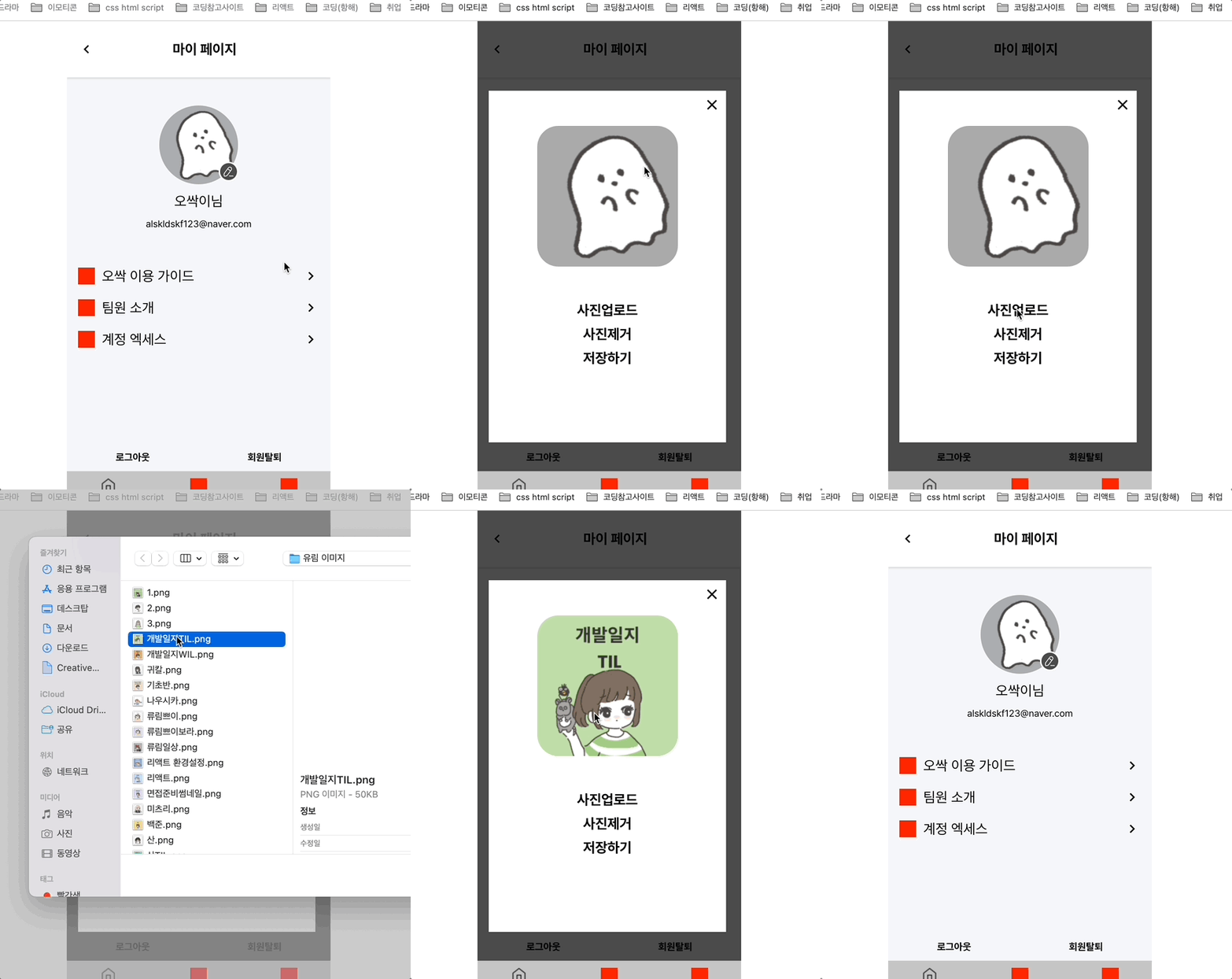
흐ㄱ...소스 코드를 뒤지고, 구글에 검색하며 리액트로 모달창을 구현해보았다 !!!!!!!!
이미지 수정 버튼 있는 JS
import React,{useState} from 'react';
import {Button,Grid,Image,Text} from '../../elements/index';
import {ProfileModal} from './index';
import styled from 'styled-components';

const MyProfile = () => {

    const [isOpen,setIsOpen] =useState(false);
    const openModalHandler=()=>{
        setIsOpen(!isOpen);
    };
    return (
        <React.Fragment>
            <Grid>
                <Grid width="100%" margin="40px 0" height="180px"
                position="relative" display="flex" flexDirection="column" alignItems="start" justifyContent="center"
                >
                    <Grid width="100%" display="flex" justifyContent="center"  position="relative">
                        <Image type="circle" size="112"/>
                        <Button is_edit position="absolute" top="80px" right="35%" _onClick={openModalHandler}/>
                    </Grid>
                    <Grid width="100%" display="flex" padding="12px 0" justifyContent="center">
                        <Text  size="1.250rem" cursor="pointer">오싹이님</Text>
                    </Grid>
                    <Grid width="100%" display="flex" justifyContent="center">
                        <Text  size="0.85rem" cursor="pointer">alskldskf123@naver.com</Text>
                    </Grid>
                </Grid>
                    {isOpen ?
                    (<>
                    <ModalBackdrop onClick={openModalHandler}>


                    </ModalBackdrop>
                    <ProfileModal isOpen={isOpen} setIsOpen={setIsOpen}/>
                    </>
                    )
                    : null}
            </Grid>


        </React.Fragment>
    );
};
const ModalBackdrop = styled.div`
  width: 100%;
  height: 100%;
  position: absolute;
  top:0;
  left:0;
  display: flex;
  z-index:2;
  justify-content: center;
  align-items: center;
  background: rgba(0, 0, 0, 0.7);
`;

export default MyProfile;
isOpen 이 트루값 일때만, 모달창을 보여주게 하고,
모달창 컴포넌트에 isOpen 그리고 setIsOpen을 주입했다 !!
모달창 js
import React,{useState,useRef} from 'react';
import styled from 'styled-components';
import {Button,Grid,Image} from '../../elements/index';
import defaultImg from '../../static/images/default.svg'
//heic 이미지 파일을 jpeg로 변환하는 라이브러리
import heic2any from "heic2any";
// 이미지 압축 라이브러리
import imageCompression from "browser-image-compression";

const ProfileModal = (props) => {

    const {isOpen,setIsOpen}=props;
    const ModalClose=()=>{
        setIsOpen(!isOpen)
    }

    const fileInput = useRef();

    const [image, setImage] = useState(null);
    const [preview, setPreview] = useState(null);
    const [isWarning, setIsWarning] = useState(false);

    const selectFile = async (e) => {
        const reader = new FileReader();
        let file;
        // 이미지 resize 옵션 설정 (최대 width을 400px로 지정)
        const options = {
          maxSizeMB: 2,
          maxWidthOrHeight: 200,
        };
        if (
          fileInput.current.files[0].name.split(".")[1] === "gif" ||
          fileInput.current.files[0].name.split(".")[1] === "GIF" ||
          fileInput.current.files[0].name.split(".")[1] === "heic" ||
          fileInput.current.files[0].name.split(".")[1] === "HEIC"
        ) {
          file = fileInput.current.files[0];
        } else {
          file = await imageCompression(fileInput.current.files[0], options);
        }
        const maxSize = 20 * 1024 * 1024; // 파일 용량 제한 (20MB)
        if (file.size > maxSize) {
          setIsWarning(true);
        } else {
          setIsWarning(false);
          if (file.name.split(".")[1] === "heic" || file.name.split(".")[1] === "HEIC") {
            let blob = fileInput.current.files[0];
            // blob에다가 변환 시키고 싶은 file값을 value로 놓는다.
            // toType에다가는 heic를 변환시키고싶은 이미지 타입을 넣는다.
            heic2any({ blob: blob, toType: "image/jpeg" })
              .then(function (resultBlob) {
                //file에 새로운 파일 데이터를 씌웁니다.
                file = new File([resultBlob], file.name.split(".")[0] + ".jpg", {
                  type: "image/jpeg",
                  lastModified: new Date().getTime(),
                });
                reader.readAsDataURL(file);
                reader.onloadend = () => {
                  setPreview(reader.result);
                };
                if (file) {
                  setImage(file);
                }
              })
              .catch(function (err) {
                console.log("이미지 변환 오류", err);
              });
          }
          reader.readAsDataURL(file); //파일 내용 읽어오기
          // onloadend: 읽기가 끝나면 발생하는 이벤트 핸들러
          reader.onloadend = () => {
            // reader.result는 파일의 컨텐츠(내용물)입니다!
            setPreview(reader.result);
          };
          if (file) {
            setImage(file);
          }
        }
      };
    return (
        <React.Fragment>
            {isOpen ?
            (<Outter>
                <Grid width="100%" height="500px" margin="16px" bg="#fff" position="relative">
                <Button is_close position="absolute" right="8px" top="8px" _onClick={ModalClose}/>
               <Grid display="flex" flexDirection="column" alignItems="center" >

                        <Grid width="200px" height="200px" margin="50px 0">
                        <Image
                            className="edit"
                            shape="rectangle"
                            size="90"
                            radius="30px"
                            src={preview ? preview :
                                // userInfo.profileUrl ? userInfo.profileUrl :
                                 defaultImg}
                        ></Image>

                        </Grid>


                    <Grid width="200px" height="200px" display="flex" flexDirection="column" alignItems="start" >

                        <Label htmlFor="file_input" className="upload-box">
                          <Grid>사진업로드</Grid>
                        </Label>
                        <Button width="200px" height="24px"
                        padding="none" margin="10px 0"
                         fontSize="1.25rem" backgroundColor="none">사진제거</Button>
                        <Button width="200px" margin="none" padding="none" height="24px" fontSize="1.25rem" backgroundColor="none">저장하기</Button>
                    </Grid>
                    <input type="file" id="file_input" ref={fileInput} onChange={selectFile} style={{display:"none"}} />
                </Grid>
            </Grid>
            </Outter>
            )
            :null

            }
        </React.Fragment>
    );
};
const Outter=styled.div`

  width:90%;
  position: absolute;
  top:50%;
  left:0;
  transform: translate(0, -50%) ;
  z-index:4;

`
const Label=styled.label`
 width:200px;
 text-align:center;
 font-size:1.250rem;
 font-weight:bold;

`;
export default ProfileModal;
조금 길지만 @@@
이렇게 모달창을 완성시켰다..!@@@@!!!
728x90
반응형
'TIL > 2022 TIL' 카테고리의 다른 글
| [항해99 60일차] 2022.05.04 TIL (리액트 카카오 소셜 로그인) (0) | 2022.05.05 |
|---|---|
| [항해99 59일차] 2022.05.03 TIL (지도 줌 인 줌 아웃 할때 이벤트 발생 시키기, 커스텀 오버레이 생성) (0) | 2022.05.04 |
| [항해99 55일차] 2022.04.30 TIL (지도 모듈 파일) (0) | 2022.04.30 |
| [항해99 54일차] 2022.04.29 TIL (Debounce 와 Throttle) (0) | 2022.04.30 |
| [항해99 53일차] 2022.04.28 TIL (리액트 스와이프 기능) (0) | 2022.04.29 |