
티스토리 뷰
목차
반응형
오늘은 검색리스트에서 나온 오피스 매물을 클릭하면,
지도로 위치 띄워주는 것과 아래에 매물 정보를 띄워주는 뷰를 만들었다 ...
ㅠㅠ 아직 와이어프레임이 없다보니까..
나 혼자 와이어프레임 짜고..
뷰 그리고..
ㅠㅠ
그러고 있다 지금..ㅎㅎ
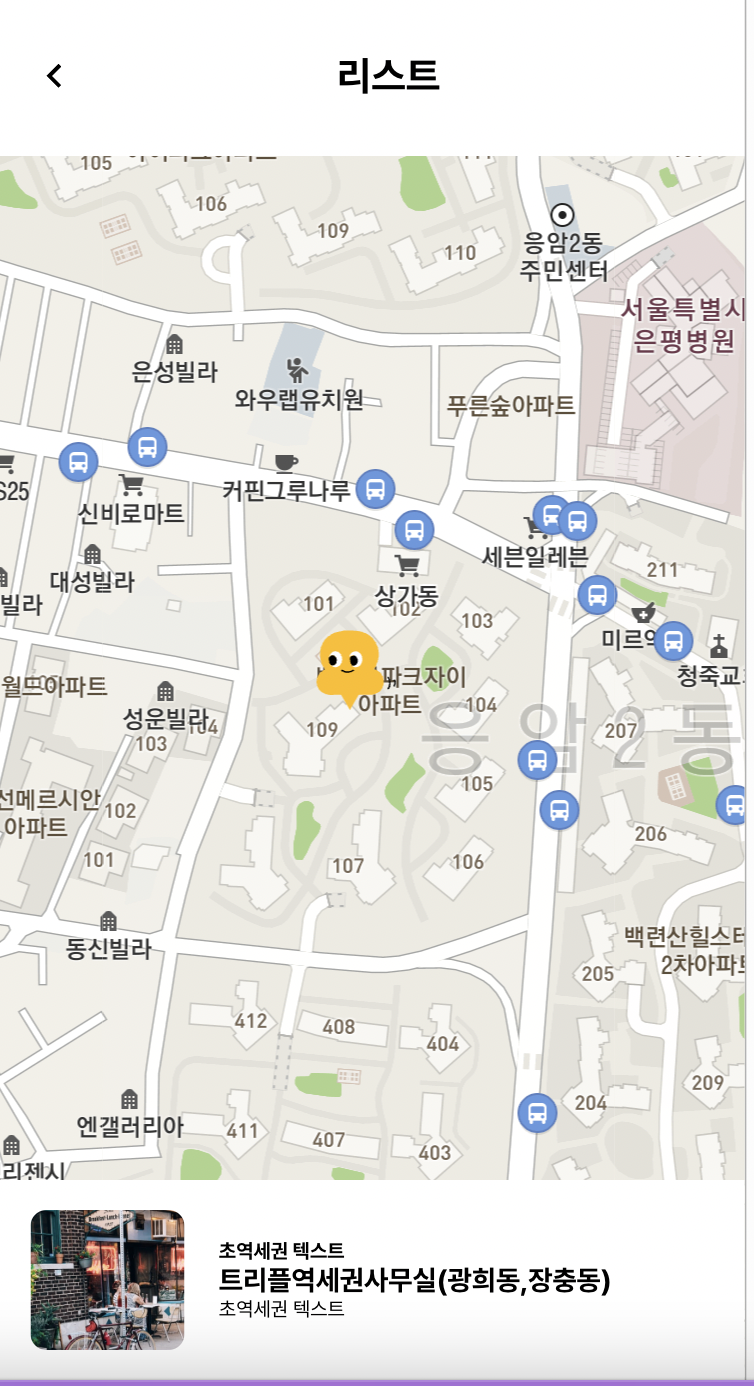
바로 이 페이지다 ㅎㅎㅎㅎ
똥이 너무 귀여워 ㅎㅎㅎㅎ마커는 ..디자이너님이 그려주신 오싹이 캐릭터를 내가 조금 변형 시켜서 ㅎㅎ
마커 이미지로 넣어버렸다.
위의 소스 코드
import React, { useEffect } from "react";
import { useSelector } from "react-redux";
import styled from "styled-components";

import onePin from '../../static/images/onePin.svg';


const KakaoMap = (props) => {
  const { kakao } = window;
  //const estateid = useParams().estateId;
  const {estateid} =props
  console.log(estateid)
  const list =[]
//   const list = useSelector((state) => state.office.office_list);
//   const officeData = list?.filter((a) => a.estateid === +estateid);
//   const firstY = officeData?.map((a) => a.coordinate.lat);
//   const firstX = officeData?.map((a) => a.coordinate.lng);
  const firstY = 37.592113779824636;
  const firstX = 126.92199098323738;

  useEffect(() => {
    let container = document.getElementById("map");
    container.style.width = "100%";
    container.style.height = "88vh";
    var options = {
      center: new kakao.maps.LatLng(firstY, firstX),
      level: 3,
    };

    let imageSrc = onePin, // 마커이미지의 주소입니다
      imageSize = new kakao.maps.Size(40, 40), // 마커이미지의 크기입니다
      imageOption = { offset: new kakao.maps.Point(27, 69) }; // 마커이미지의 옵션입니다. 마커의 좌표와 일치시킬 이미지 안에서의 좌표를 설정합니다.

    let markerImage = new kakao.maps.MarkerImage(
      imageSrc,
      imageSize,
      imageOption
    );

    let map = new kakao.maps.Map(container, options);
    // list.forEach((a) => {
    //   // 마커를 생성합니다
    //   new kakao.maps.Marker({
    //     //마커가 표시 될 지도
    //     map: map,
    //     //마커가 표시 될 위치
    //     position: new kakao.maps.LatLng(firstY, firstX),
    //     image: a.estateid === +estateid ? markerImage : markerImage,
    //     title: a.title,
    //     zIndex: a.estateid === +estateid ? 1 : 0,
    //   });
    // });
    new kakao.maps.Marker({
        map: map,
        position:new kakao.maps.LatLng(firstY, firstX),
        image:markerImage,
        zIndex:1,
    })
  }, [firstY, firstX]);

  return (
    <React.Fragment>
      <MapWrap id="map" />
    </React.Fragment>
  );
};

const MapWrap = styled.div`
    width: 500px;
    height: 400px;
`;

export default KakaoMap;
위의 컴포넌트를 임포트한 곳..!!!!
import React from 'react';
import styled from 'styled-components';
import { MyHeader } from '../components/my/index';
import { OneMap } from '../components/map/index';
import { Grid,Image,Text } from '../elements/index';
import { useParams } from "react-router-dom";
import { useSelector } from "react-redux";
import { history } from '../redux/configStore';

const SearchMap = () => {
    const estateid = useParams().estateId;
    //   const list = useSelector((state) => state.search.list);
//   const officeData = list?.filter((a) => a.estateid === +estateid);
    return (
        <React.Fragment>
            <MyHeader>리스트</MyHeader>
            <OneMap estateid={estateid}/>
            <DetailWrap>
                {/* 맵돌리기 */}
                <Grid display="flex"  justifyContent="space-between" alignItems="center" _onClick={()=>{
                        history.push(`/detail/${estateid}/`)
                }}>
                    <Grid width="25%" height="70px" margin="0 5% 0 0" overflow="hidden" borderRadius="8px">
                        <Image src="https://velog.velcdn.com/images/ryurim0109/post/6435c602-4d7e-4018-81fa-269d93d5d351/image.jpg" shape="rectangle" />
                    </Grid>
                    <Grid width="80%"  height="70px" display="flex" flexDirection="column"  justifyContent="center">
                        <Text bold size="0.625rem">초역세권 텍스트</Text>
                        <Text bold size="0.875rem">트리플역세권사무실(광희동,장충동)</Text>
                        <Text size="0.625rem">초역세권 텍스트</Text>
                    </Grid>
                </Grid>
                 {/* 맵돌리기 */}
            </DetailWrap>
        </React.Fragment>
    );
}
const DetailWrap=styled.div`
    width:100%;
    height:100px;
    background:#fff;
    position: fixed;
    bottom: 0px;
    z-index: 1;
    padding:0 16px;


`;
export default SearchMap;
일단 아직 api통신은 하지 않았다.
이부분은 스토어에 저장되어있는 서치 리스트 중에서 부동산 id와 서치 리스트의 id가 같은 것만 필터로 골라내서
쓸 것이기 때문에 따로 api통신은 필요하지 않을 것 같다.
내일은 상세페이지 와이어프레임이 완성되는대로
상세페이지 뷰 그리고, 나머지 작업들도 슬슬 마무리 해야겠다.ㅠㅠ
레벨에 따라 다른 .. 오버레이도 보여줘야되고 할 일이 많은데 ㅠㅠ..
뭔가 하고나면 허무한 기분이 든다 !!!
챌린지..한 무언가를 나도 해보고 싶다 ㅎㅎ!! 지도는 여기까지만 하고싶은 기분?이랄까..ㅎㅎ
728x90
반응형
'TIL > 2022 TIL' 카테고리의 다른 글
| [항해99 67일차] 2022.05.11 TIL (무한스크롤 구현) (0) | 2022.05.12 |
|---|---|
| [항해99 66일차] 2022.05.10 TIL (지도 오버레이 클릭시 상세페이지로 이동) (2) | 2022.05.10 |
| [항해99 63일차] 2022.05.07 TIL (리액트 가격 필터? 카테고리 필터 뷰) (1) | 2022.05.08 |
| [항해99 62일차] 2022.05.06 TIL (리액트로 탭메뉴 구현) (1) | 2022.05.06 |
| [항해99 61일차] 2022.05.05 TIL (어린이날에 공부라니ㅠㅠ) (3) | 2022.05.06 |