
티스토리 뷰
목차
<오늘 할 일>
1. 무한스크롤 or 수정기능구현
2. 알고리즘 문제 풀기
3. 자바스크립트 기초 문법 TIL에 정리하기
4. 회사 리스트업
아.. 어제 ,, 누웠는데 잠이 안와서 새벽 한시쯤 잤더니
넘 넘 피곤스하다. 🤨
블로그..항해99TIL검색하니까..
너무 열심히 하시는 분들이 많아서 자극받았다...!!!
수정 기능은 꼭 구현해야지 !
수정 기능을 위한...덕스구조 js
//액션타입
const MODIFY='word/MODIFY'; //댓글 수정 기능

//액션 크리에이터
export function modifyWord(word_index,edit){
    return{type:MODIFY,word_index, edit}
};
//미들웨어는 아직;;

//리듀서
      case "word/MODIFY":{
          const new_word_list = state.list.map((l,idx) => {
            if(parseInt(action.word_index)===idx){
              return{...l,...action.edit};
            }else{
              return l;
            }
          });
          return{list: new_word_list}
      };
app.js
import React from 'react';
import { Route,Switch } from 'react-router-dom'
import './App.css' //reset.css
//page
import Main from './components/Main';
import Header from './components/Header';
import WordAdd from './components/WordAdd';
import NotFound from './components/NotFound';
import Modify from './components/Modify';
//로드할때 필요, 리덕스 업데이트 훅
import {loadWordFB} from './redux/modules/word';
import { useDispatch } from "react-redux";


function App() {
  const dispatch = useDispatch();

  React.useEffect(() => {
    dispatch(loadWordFB());
  }, [dispatch]); //이거 안써주면, 화면에 단어 안붙음 디스패치 빼면, 무한루프에 빠짐..

  return (
    <div className="App">
      <Header />
      <Switch>
        <Route path ="/" exact component={Main}/>
        <Route path ="/word/add"  component={WordAdd}/>
        <Route path ="/modify/:word_id" component={Modify} />
        <Route component={NotFound} />
      </Switch>
    </div>
  );
}

export default App;
Modify라는 컴포넌트를 새로 하나 만들었다.
카드 붙는 메인 js에 버튼 하나를 추가해줬다.
 <Link to={{
                                pathname:'/modify/'+words[idx].id,
                                state:{id:words[idx].id,
                                        word:words[idx].word,
                                        desc:words[idx].desc,
                                        example:words[idx].example,
                                        completed:words[idx].completed
                                }
                            }}>
                                <button style={{backgroundColor: list.completed ?"#123389":"#e4ebfb"}}>
                                    <HiPencilAlt style={{color: list.completed ?"#fff":"#123389",
                                        width:"30px",height:"30px" }}/>
                                </button>
                            </Link>
수정 js
import React from "react";
import styled from "styled-components";
import { useHistory, useLocation} from "react-router-dom";
import { useDispatch } from "react-redux";
import { modifyWord } from "../redux/modules/word";


const Modify = (props) =>{

    const location =useLocation();
    const dispatch =useDispatch();
    const history =useHistory();

    const word = React.useRef(null); //초기값은 null 단어
    const desc = React.useRef(null); //초기값은 null 설명
    const example = React.useRef(null); //초기값은 null 예시

    const stateId=location.state.id;
    const stateWord=location.state.word;
    const stateDesc=location.state.desc;
    const stateEx=location.state.example;
    const stateCom=location.state.completed;


    const editWord =()=>{

        dispatch(
            modifyWord(stateId,{
                 word: word.current.value.trim(),
                desc: desc.current.value.trim(),
                example: example.current.value.trim(),
                completed:stateCom
            })

        )
        history.push("/");
    }


    return (
        <>
        <AddOutter>
            <div>
                <h3>단어 수정하기</h3>
                <WordBox>
                    <div>
                        <label>단어</label>
                        <input type="text" ref={word} defaultValue={stateWord}/>
                    </div>
                    <div>
                        <label>설명</label>
                        <input type="text" ref={desc} defaultValue={stateDesc}/>
                    </div>
                    <div>
                        <label>예시</label>
                         <input type="text" ref={example} defaultValue={stateEx}/>
                    </div>
                    <button type="submit" onClick={editWord}>단어 수정</button>
                </WordBox>
            </div>

        </AddOutter>
    </>
    );
}
//스타일
const AddOutter=styled.section`
    width:100%;
    position:relative;
    top:80px;
    height:100%;
    padding:60px;
    display:flex;
    justify-content:center;

    @media screen and (max-width: 500px){
        top:60px;
        }

        & > div{
            width:400px;
            min-height: 70vh;
            background: #e4ebfb;
            border-radius:8px;
            position:relative;
        }
        & > div> h3{
            width: 100%;
            text-align:center;
            font-size: 36px;
            padding:10px;
            font-family:"Dongle";
            @media screen and (max-width: 500px){
                font-size: 30px;
            }
        }
`;
const WordBox =styled.div`
            width:100%;
            height:320px;
            display:flex;
            flex-direction:column;
            justify-content:center;
            align-items:center;
            gap:50px;

        & div {

        }
        & label{
            font-family:"Dongle";
            font-size:32px;
            margin-right:10px;
        }
        & input{
            width:200px;
            height:40px;
            border: 1px solid #97ACE3;
            border-radius:5px;
        }
        & input:focus {
            border: 1px solid #123389;
        }
        & > button {
            width:150px;
            height:40px;
            font-family:"Dongle";
            font-size:32px;
            cursor:pointer;
            border-radius:5px;
            background:#97ACE3;
            color:#123389;
        }
        & > button:hover{
            background:#123389;
            color:#97ACE3;
        }
`;

export default Modify;
일단 미들웨어 안 만들었더니 수정한 것이 새로운 단어로 추가되는 현상이 발생..ㅋㅋㅋㅋㅋ
//미들웨어

export const modifyWordFB=(id,newWord) =>{ //단어 수정 id값과 새로운 단어를 받아온다.
    return async function(dispatch,getState){
      const docRef=doc(db,"word",id);
      //console.log(id,newWord)
      await updateDoc(docRef,{...newWord})

      const _word_list=getState().word.list; //getstate사용해서 word에 있는 리스트 정도 긁어오고,
      const word_index =_word_list.findIndex((w)=>{
        return w.id === id; //리스트 안에 id가 파라미터 id와 일치하다면 그친구의 idex 가져와
      });
      const newdata = {...newWord, id:id}
      dispatch(modifyWord(word_index,newdata));
    };
};
이렇게 했더니 수정도 잘된다.ㅠㅠ
감격..물론 내가 짠 건 아니고...코드 보면서했당..
하핫..

음 일단 여기까지 했으니까...무한 스크롤은 미뤄두고,,
노마드 코더 강의..중에서 트워터 클론 코딩 강의가 있는데 무료로 들을 수 있어서 한번 ..들어보겠다 !!!
듣기전에 리액트 훅부터 잘 알아야될 것같아서..
실전형 리액트 HOOKS 10개 강의를 듣겠다 !
이 사이트에서 하면 리액트 환경설정은 따로 하지 않아도 된다.
hooks은 react의 state machine에 연결하는 기본적인 방법이다.
음 이걸 보다가..항해톡하고, 매니저님과 마일스톤 하니까 시간이 10시가 되어버렸다.
일단 단어 추가하기 눌렀을 때 아래에 붙는게 아니라 맨 위에 붙게 하고 싶었는데,
그건 성공했다.. 기술 매니저님 덕분에 !!!!
  case "word/CREATE": {
        const new_word = [ action.word, ...state.list]; // 순서 바꿔서 최근 word가 앞에 붙게 !!
        return { list: new_word };
      }
리듀서 케이스 문에서 action.word를 앞에 붙여주면,, 되었다.
이렇게 간단한 걸 나는 생각하지 못했다.ㅠㅠ
아마도 덜 이해해서 그렇겠지???
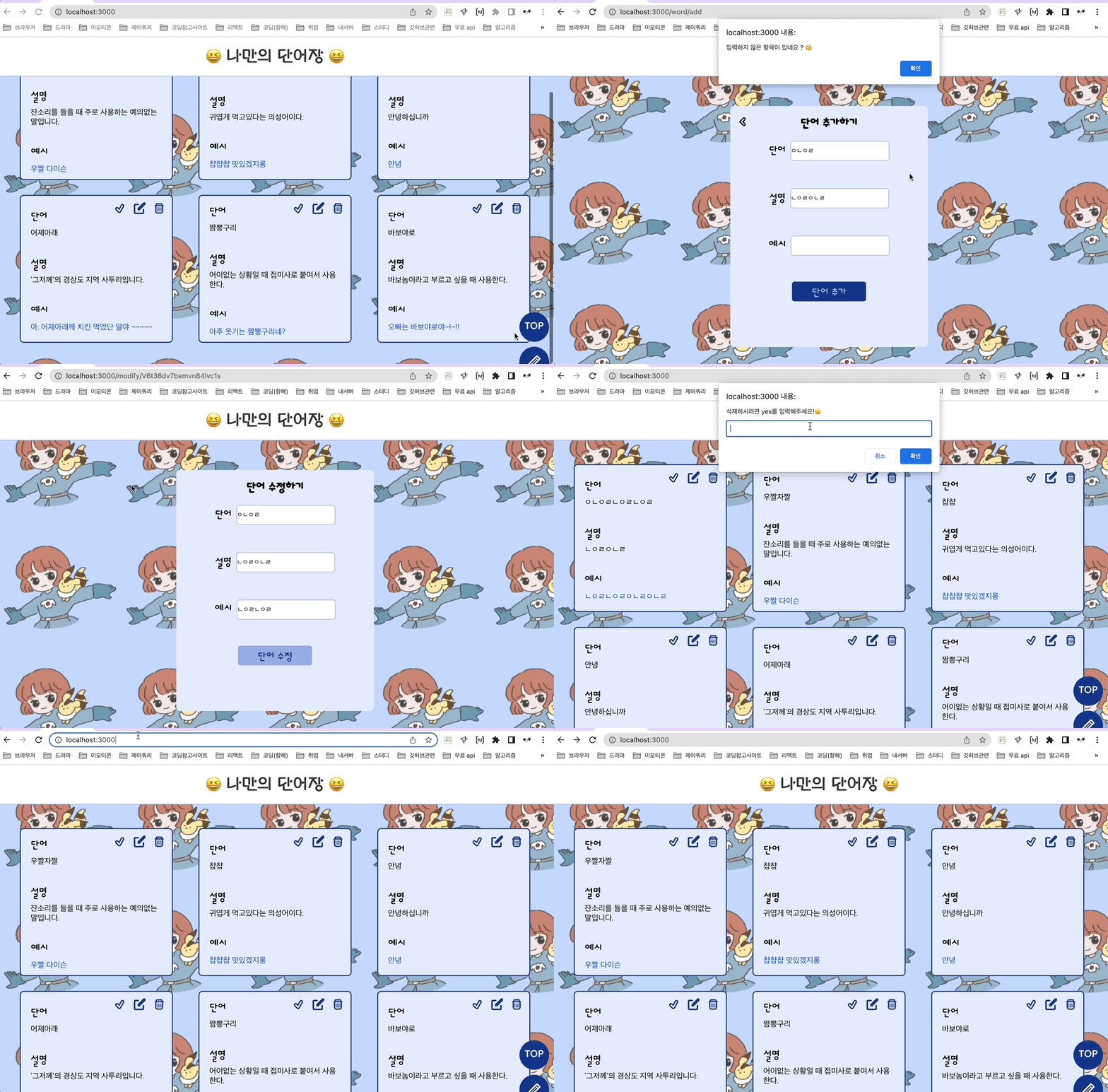
완성본이다 !!
이제 배포만 하면 끝~!
'TIL > 2022 TIL' 카테고리의 다른 글
| [항해99 26일차] 2022.04.01 TIL /프로토타입, 컴포넌트 쪼개기 (0) | 2022.04.01 |
|---|---|
| [항해99 25일차] 2022.03.31 TIL /개인과제 배포 및 제출 (0) | 2022.04.01 |
| [항해99 23일차] 2022.03.29 TIL /단어 선택해제 스타일 주기 (2) | 2022.03.29 |
| [항해99 22일차] 2022.03.28 TIL /업데이트 기능 (0) | 2022.03.28 |
| [항해99 20일차] 2022.03.26 TIL /삭제기능 (0) | 2022.03.26 |